
To Apply a Bad Debt Status to a Patient's Account
Before you begin
Procedure
- Open the patient's record.
-
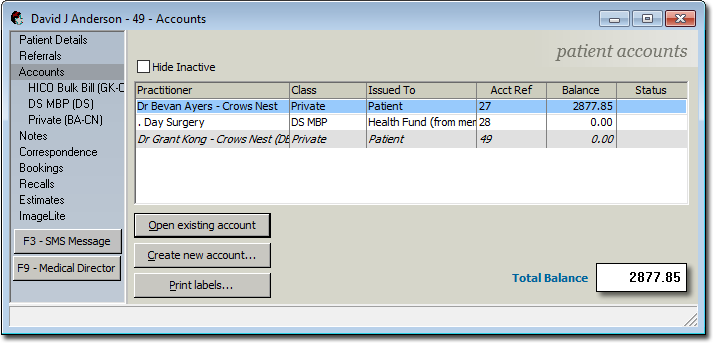
Select Accounts from the margin menu.
-
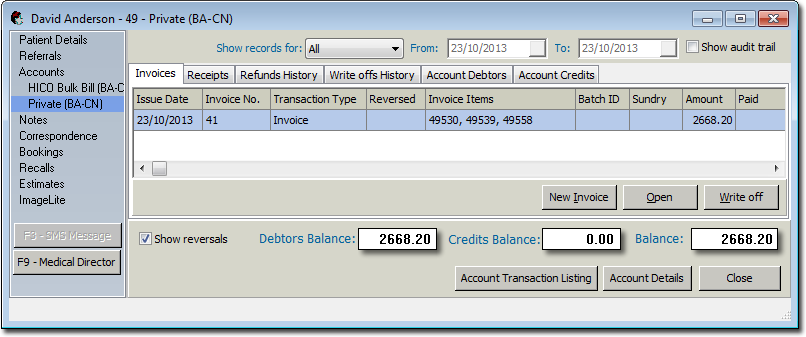
Select an account and click Open Existing Account The list
of invoices for that account are displayed.
-
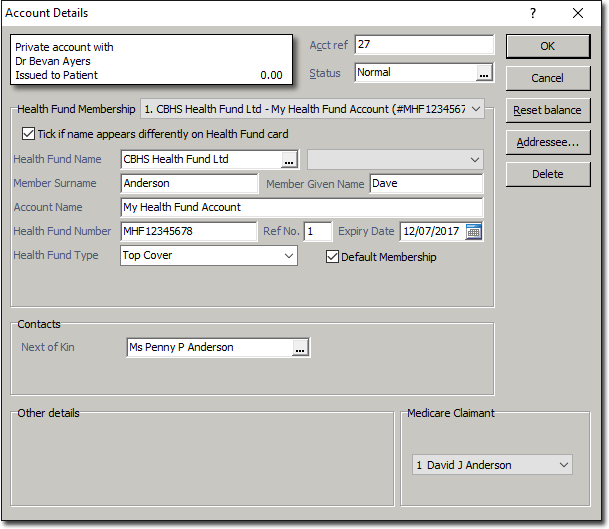
Select an invoice and then click Account Details. The
Account Details window appears.
-
Click
 Ellipsis within the Status field.
The Account Status window appears.
Ellipsis within the Status field.
The Account Status window appears.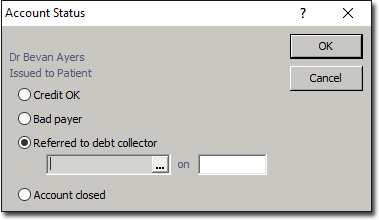
- Select the Referred to Debt Collector option.
-
Click Ellipsis to select a debt
collector.
- Enter the date on which the referral was made into the remaining text box.
- Click OK.
Results
- When searching for patients, you will notice that this patient has a pink Bad Debt warning on the Search window.
- If an attempt is made to make an appointment for this patient, a warning appears reminding the user of the patient's status.
- If an attempt is made to create an invoice or receipt for this patient, a warning appears reminding the user of the patient's status.
- On the patient's Accounts window, the Status column will display BAD DEBT.