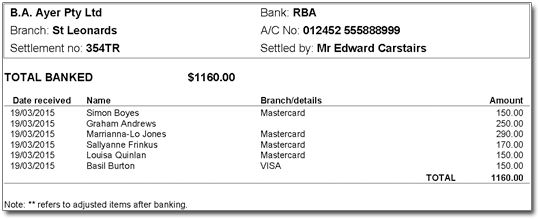
Settle your EFTPOS payments either at the end of the working day or first thing in the
morning prior to the new day's processing.
Before you begin
The EFTPOS window enables you to reconcile your EFTPOS machine (TYRO - EFTPOS Auto or Bank
Terminal - EFTPOS Manual) to the daily tally of transactions processed in Bluechip.
Procedure
-
Within Bluechip,
click Practice Explorer or press F12 on
your keyboard.
-
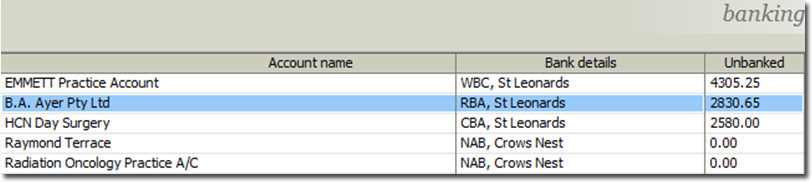
The Practice Explorer appears. Select Banking from the margin menu. This will display the Bank Account Name, Bank Details and the Unbanked totals.
-
To open the bank account you want to perform banking for, either double-click the account, or select it and click Open
-
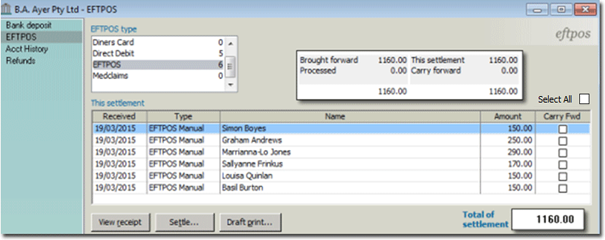
Select EFTPOS from the margin menu. The EFTPOS window appears.
-
The EFTPOS Type selection defaults to AMEX, click on
EFTPOS. This will display the number of transactions been
issued, and display the EFTPOS transactions incorporated in the settlement
amount.
-
The options available in EFTPOS Settlement window:
- Carry Fwd: Allows you to allocate an amount not to be
included in the deposit. This amount will be available to be included in a
future deposit date, such as when reconciling direct debits with a bank
statement and settling receipts with actual deposit dates.
- View Receipt: Allows you to view a receipt to print or
adjust.
- Draft Print: Allows a user to print a draft copy of the
deposit slip prior to finalising the deposit.
-
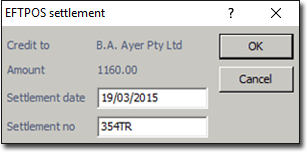
Once satisfied your EFTPOS machine matches the Settlement amount in Bluechip, click
Settle. The EFTPOS Settlement window
appears.
-
Amend the Settlement Date (if reconciling on a weekly or monthly basis), and enter
a Settlement Number if required (from your terminal settlement summary, not all
settlements generate a number), and then click OK.
Results
The Print EFTPOS window appears to print the settlement, and
also resets the balance to zero.
What to do next
The EFTPOS Settlement printout can be either cancelled (not
printed) or printed to be stapled to your EFTPOS receipts and the Terminal Settlement
printout for cross reference.