
Part-Paid Claims with Medicare Easyclaim
Before you begin
This topic refers to processing Part-Paid claims with Medicare Easyclaim.
- For making fully-paid Patient claims, see Patient Claims with Medicare Easyclaim.
- For making bulk bill claims, see Bulk Bill Claims with Medicare Easyclaim.
Procedure
-
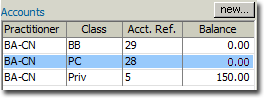
Open the patient's record and locate the Accounts section.
-
Within the New Invoice, add Service Items as desired. In the example below, Item 304 has been entered.

-
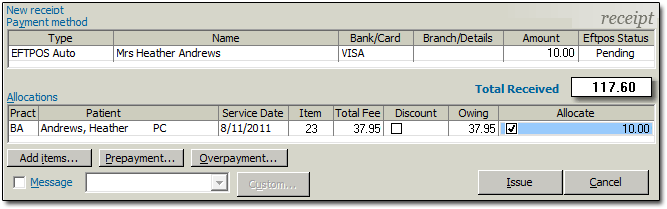
Click the New Receipt button, and then within the receipt window, enter the following:
- Select EFTPOS Auto as the type of payment.
- Enter the card holder's Name.
- Enter the Amount of the payment.
- Place a tick in the Allocate check box against each service item you want to allocate payment to.
-
Click Issue. The New Patient Claim
window appear.
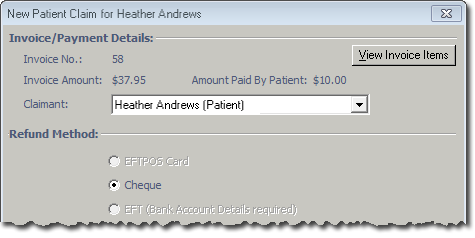
Note that for part-paid/unpaid patient claims, the Cheque option is selected automatically. Where Medicare benefits are assessed as payable for a claim, a statement and/or cheque in the provider's name will be forwarded to the claimant's address recorded by Medicare. The cheque is then forwarded by the claimant to the provider with any outstanding balance. Where no benefit is assessed as payable, a statement only will be forwarded to the claimant's address recorded by Medicare. -
Click Send The online claim process commences, and you can
track its progress on-screen.
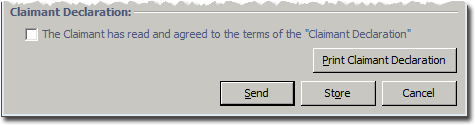
Note that if you click the Store button at this time, the claim will be processed via Medicare Online instead of via Medicare Easyclaim.