Before you begin
This topic refers to processing Fully-Paid Patient Claims with Medicare Easyclaim.
Procedure
-
Ensure you have enabled
Medicare Easyclaim.
-
Ensure you have configured for
processing claims with Medicare
Easyclaim.
-
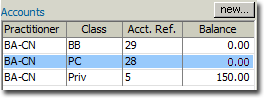
Open the patient's record and locate the Accounts section.
-
Locate and right-click the Patient Claim account. In the example above, it is the 'PC' account.
-
From the right-click menu that appears, select New Invoice. You may be prompted to verify the patient with Medicare if you have not previously done so.
-
Within the new invoice, add Service Items as desired. In the example below, Item 304 has been entered.

-
Click Issue to issue the invoice. You may be prompted to
select a referral to associate this invoice with.
-
You will be prompted to select the Date of Issue. Alter it if desired, and then click OK.
-
You will be prompted to print the invoice. Then, select the
Receipts tab.
-
Click New Receipt and then within the receipt window, enter
the following:
- Select EFTPOS Auto as the type of payment.
- Enter the card holder's Name.
- Enter the Amount of the payment.
- Place a tick in the Allocate check box against each
service item you want to allocate payment to.
-
Click Issue. The New Patient Claim
window appear.
-
Within the Refund Method section, select from the following options:
- EFTPOS Card: The refund will be credited to the patient's EFTPOS card account.
- Cheque: The refund will be returned to the patient as a cheque.
- EFTPOS: The EFT Details section of the window becomes available. Enter the patient's bank account details. The refund will be credited to the nominated bank account.
-
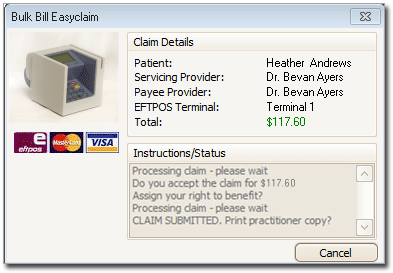
Click Send. On the TYRO terminal, have the patient swipe
their card, select their account type, and enter their PIN. The online claim process
commences, and you can track its progress on-screen, as shown below.
-
On the TYRO terminal, the patient will be prompted to accept the claim.
Results
Upon a success, the patient's claim will have been reimbursed to them.
- The TYRO terminal will print a receipt for the patient.
- The patient will receive a tax invoice printed from Bluechip.
- The Patient Claim Results window appears in Bluechip.
