Contact a patient based on a phone recall.
Procedure
-
From within either the patient's record or the Practice Explorer, select Recalls from the Margin Menu.
-
Locate and select the recall that you want to action.
- (Optional) Filter the list of recalls, by entering a date range of due recalls. A common scenario is to print all of the following month's recalls towards the middle or end of the current month.
- (Optional) Enable the View Old check box to refresh the recalls list to include recalls that have previously been actioned.
-
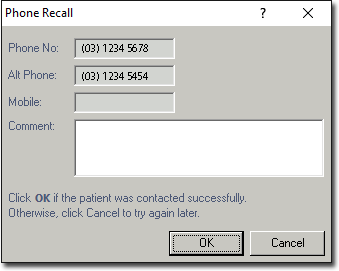
Click Contact/print. The Phone Recall
window appears.
-
Call the patient. If you could not contact the patient, click
Cancel and try again later.
-
(Optional) Enter a comment if necessary.
-
Click OK to indicate that the patient was contacted
successfully.
Results
The recall will now be removed from the patient's record.
