
Uninstalling Bluechip

How to uninstall and reinstall Bluechip.

Procedure

  1. Ensure you have made a backup. For more information, see Backup Utility.
  2. Back up any documents scanned into Bluechip. Browse to the following locations on your server computer, and copy the folders ‘Documents’ and ‘Imaging’ (if they are present) to an external drive.
    • C:\Manageezy\HCN\Documents
    • In XP - C:\ Program Files\Health Communication Network\Bluechip\Bluedata\Database Name\Imaging
    • In Win7/8/10 - C:\Users\Public\Health Communication Network\Bluechip\Bluedata\Database Name\Imaging
  3. Double-click the installer file (.exe). The Bluechip installation wizard commences.
  4. Click Next to commence uninstalling Bluechip.
    • You will be prompted to confirm this action.
    • The removal process will commence, and you will be prompted upon completion.
  5. With Bluechip uninstalled, in Windows check that all Bluechip ancillary components have been uninstalled. Any Bluechip components, such as those seen in the image below, must be uninstalled manually.
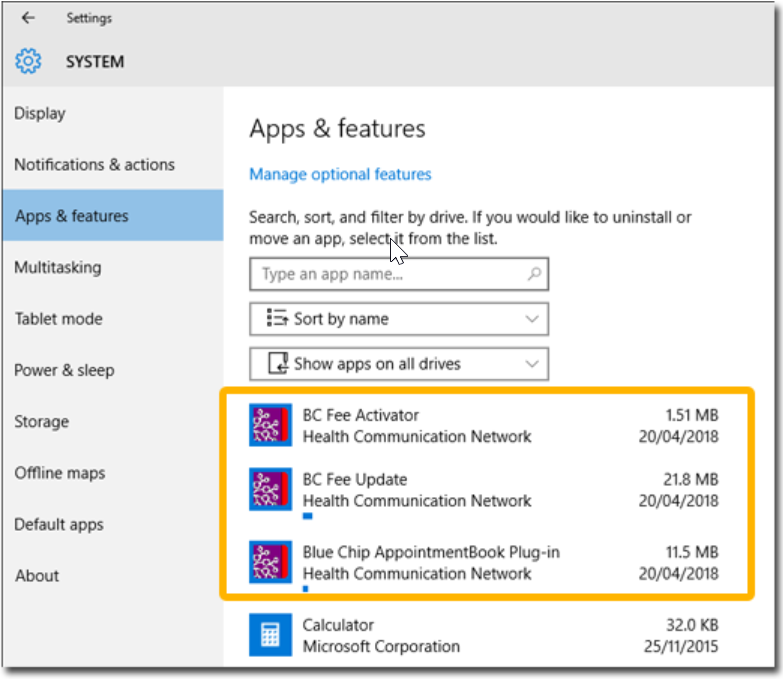
    System screen showing installed Bluechip components
  6. Locate and rename one of the following directories.
    Tip:
    Add the suffix 'OLD' to the name of the directory.
    • If you run MedicalDirector Clinical in conjunction with Bluechip, locate and rename the Bluechip directory.

      The default location of this directory is:C:\Program Files (x86)\Health Communication Network\Blue Chip

    • If you run Bluechip only, locate and rename the Health Communication Network directory.

      The default location of this directory is C:\Program Files (x86)\Health Communication Network

Results

Bluechip is uninstalled.

What to do next

If you also need to uninstall SQL, see https://knowledge.clinical.medicaldirector.com/knowledgebase/topics/Process_for_Removing_an_Instance.html in the MedicalDirector Clinical Knowledge Centre.
Note:
If you uninstall SQL, the process also uninstalls the database used by MedicalDirector Clinical (if you have it installed).

The instructions for removing SQL refer to "ESP instance". This is not relevant to a Bluechip-only installation and can be ignored.