Invoicing for Pathology Services
Create an invoice for pathology services.
Before you begin
Ensure you have:
- Indicated that the practitioner offers pathology services. This is done by ticking the Pathology Services check box within the Service Types section of General Practitioner Options.
- Ensure that the patient has their DVA number recorded within the Patient Details window of their record.
- Optionally, you have recorded customised Service Text Explanations.When recording service items for a pathology invoice, you can record Service Text associated with each Service Item you want to bill. Additionally, you can record a brief explanation to support each Service Text entry. Customised service text explanations can be recorded whenever you create a new invoice. However, it may be more convenient for you to pre-record any frequently-used explanations into a list that you can easily access later, saving you having to manually type the explanation text every time. Customised explanation text can be recorded in advance via the Billing and Fees tab of Bluechip's Practice Options.
- Ensure you are familiar with the basic process for creating an invoice.
Procedure
-
Within the new invoice, select Pathology from the Service Type drop-down list.

-
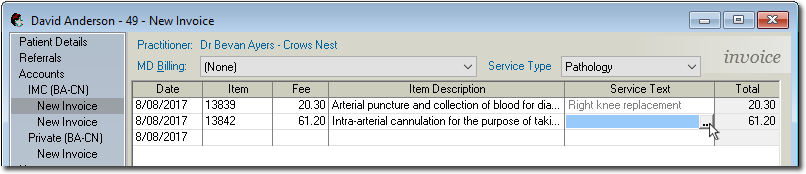
For each Service Item you add, you can indicate Service Text. To add a Service Text entry, click within the Service Text field and then either:
- Click the
 Ellipsis button, or
 - Press SPACE + ENTER
The Service Text window appears.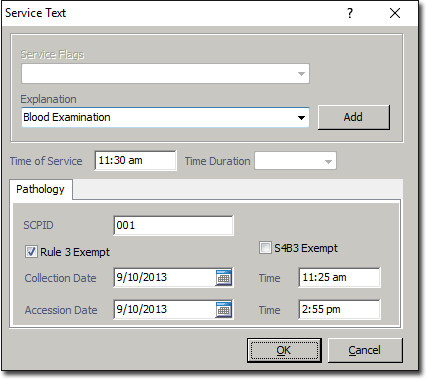
- Click the
-
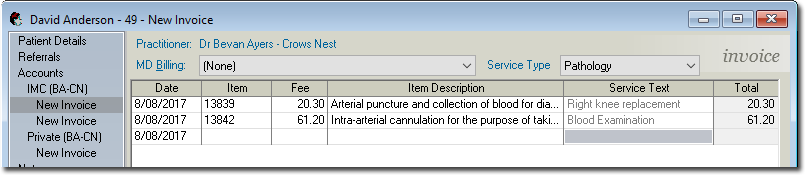
Click OK to continue. You are returned to the invoice
window.
-
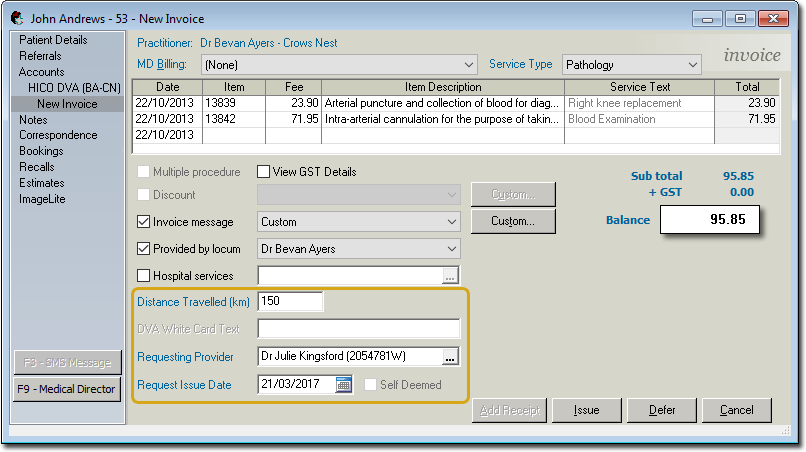
Complete the remainder of the invoice as desired, taking into consideration the following:
- (optional) Indicate the distance travelled (in km).
- Indicate either:
- The Requesting Provider and Request Issue Date, or
- That the request was self-deemed, by ticking the associated check box (available only if you have not selected a requesting provider/requested date).