
Merge Fields
By right-clicking in the message body you can access a menu of merge fields that you can then insert into your message. These field codes act as place holders for information, and will be replaced automatically by the actual information when you send the message. For example, if you enter the field code [PatName], this will insert the name of the patient for whom you are creating the message.
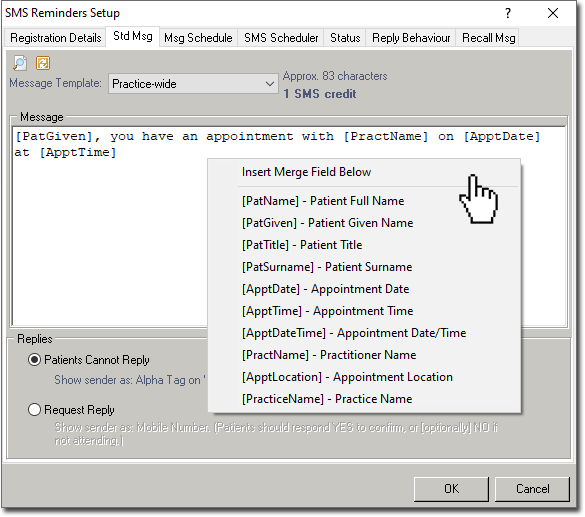
| Merge Field Definitions | |
|---|---|
| [PatName] | Patient's full name: Title Given Surname, for example, Mr David Anderson. |
| [PatGiven] | Patient's given name. |
| [PatTitle] | Patient's title, for example, Mr / Mrs / Miss / Ms; |
| [PatSurname] | Patient's surname. |
| [ApptDate] | The date of the appointment. |
| [ApptTime] | The time of the appointment. |
| [ApptDateTime] | The date and time of the appointment for example, 7Jan@8:00am |
| [PractName] | The Practitioner's name: Title Given Surname, for example, Dr B Ayers. |
| [ApptLocation] | The appointment's location – configured in the Practitioner's roster, for example, Crows Nest. |
| [PracticeName] | The account name registered with MedicalDirector.This can be found by selecting , and can only be modified in conjunction with Bluechip Customer Support. |
- Click
 at the top left of the SMS
Reminders Setup window to preview your standard message.
at the top left of the SMS
Reminders Setup window to preview your standard message. - Click
 to revert the text you've entered to the default SMS
Reminders message, which is "[PatGiven], you have an appointment with [PractName] on
[ApptDate] at [ApptTime]".
to revert the text you've entered to the default SMS
Reminders message, which is "[PatGiven], you have an appointment with [PractName] on
[ApptDate] at [ApptTime]".