
Jump to main content
Bluechip by Telstra Health logo
Knowledge Centre
  • Get Started
  • Patient Management
  • Appointment Management
  • Finance
  • Communications
  • Administration
  • Reports
  • Integrations
  • Support
Index
Feedback
Support
Version 4.3
Current (V4.3) V4.2
  1. Home
  2. Communications

    Send SMS messages or letters and add documents.

  3. SMS

    Send SMS messages from Bluechip.

  4. Configuring SMS Reminders

  • Communications

    Send SMS messages or letters and add documents.

    • Documents

    • Letters

      Write letters on behalf of a patient.

    • Transferring Documents and Letters to Clinical

    • SMS

      Send SMS messages from Bluechip.

      • SMS Recommendations

      • Registering for SMS Reminders

      • Alpha Tags in Bluechip

      • Practitioner SMS Setup

      • Patient Setup for SMS Reminders

        You can use SMS Reminders for all patients, unless you specify otherwise.

      • Configuring SMS Reminders

        • Standard Messages for SMS Reminders

          You can create standard messages (templates) for each of the Practitioners in your Bluechip database, as well as a default practice-wide standard message.

        • Message Schedule Tab

        • Status Tab

          Determine the number of SMS credits you have remaining with your SMS provider.

        • Reply Behaviour

        • Recall Messages for SMS Reminders

          You can create recall messages (templates) for each of the Practitioners in your Bluechip database, as well as a default 'Practice-wide' message.

      • Individual Reminders

        Send SMS Reminders to a single recipient.

      • Bulk Reminders

      • Changing Your SMS Password

      • Scheduling Messages (SMS Reminders)

      • SMS Audit Log

      • Merge Fields

      • Check Remaining SMS Credits

        View your remaining credits for SMS Messaging.

      • Check Your Auto-Renew Status

      • Troubleshooting (SMS Reminders)

    • Templates

Configuring SMS Reminders

You can access the SMS Reminders Setup window at any time via SMS > Setup SMS Reminders.

Only users with Change SMS Setup permission (in BC Secure), can view the SMS Setup window.
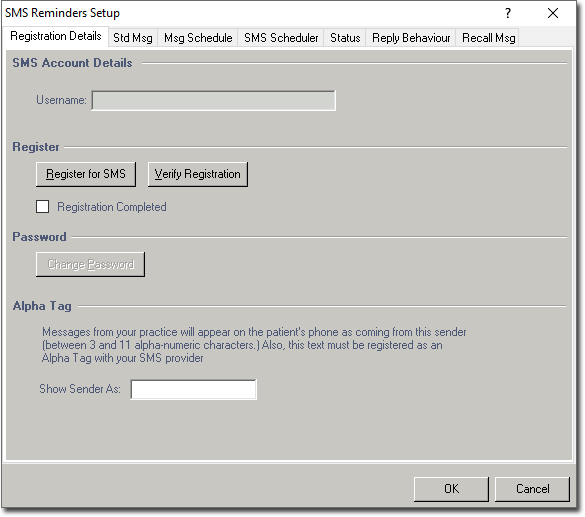


For information on the available tabs:

  • Registration Details Tab
  • Standard Message Tab
  • Message Schedule Tab
  • Status Tab
  • Reply Behaviour Tab
  • Standard Messages for SMS Reminders
    You can create standard messages (templates) for each of the Practitioners in your Bluechip database, as well as a default practice-wide standard message.
  • Message Schedule Tab
  • Status Tab
    Determine the number of SMS credits you have remaining with your SMS provider.
  • Reply Behaviour
  • Recall Messages for SMS Reminders
    You can create recall messages (templates) for each of the Practitioners in your Bluechip database, as well as a default 'Practice-wide' message.
© 2026 Telstra Health