Before you begin
Before sending an SMS Message, you can schedule a time for its delivery, via the Message Schedule
tab on the SMS Reminders Setup interface.
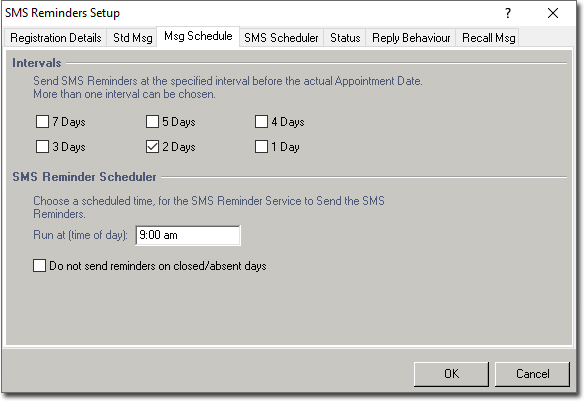
To set up message scheduling:
Procedure
-
Select .
-
Specify an interval. The Intervals check boxes indicate the interval before a patient's appointment at which the SMS reminder(s) will be sent. Any combination of days can be selected.
The scheduler can be inactivated by ensuring all these check boxes are unticked.
-
Enter the time when you want reminders to be sent in the Run at (time of
day) text box.
The nominated computer (terminal) needs to have Bluechip active at
that given time, for the SMS Reminder Scheduler to run.
