
Standard Messages for SMS Reminders
You can create standard messages (templates) for each of the Practitioners in your Bluechip database, as well as a default practice-wide standard message.
Procedure
-
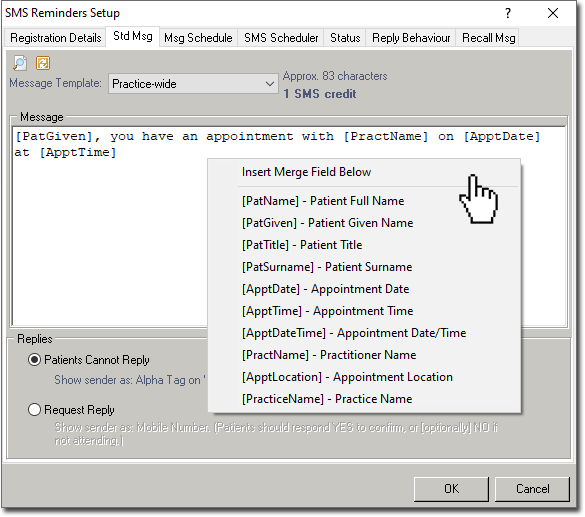
In the SMS Reminders Setup window, select the
Standard Message tab.
-
Create the standard message. Optionally, right-click in the message body to display
a list of merge fields that you can insert into your message. These merge fields are replaced automatically when you
send the message. For example, if you enter the merge field
[PatName], this will insert the name of the patient for
whom you are creating the message. The merge field is inserted at the place where you
clicked in the message. The message can have a maximum of 160 alpha-numeric
characters, including characters added by merge fields. Bluechip assumes each
merge field adds a set number of characters to the message. You can continue typing
beyond Bluechip's
estimate of the message limit, but the text is displayed in red and
struck-through.
Click
 Preview at the top left of the SMS Reminders Setup
window to preview your standard message.
Preview at the top left of the SMS Reminders Setup
window to preview your standard message.- Click
 Revert to revert the text you've entered to the default SMS Reminders
message, which is "[PatGiven], you have an appointment with [PractName] on
[ApptDate] at [ApptTime]".
Revert to revert the text you've entered to the default SMS Reminders
message, which is "[PatGiven], you have an appointment with [PractName] on
[ApptDate] at [ApptTime]".
- Click