
Day Sheet Report
The Day Sheet report displays an 'end-of-day' snapshot, enabling you to review and reconcile all transactions on a daily basis.
Before you begin
- Every receipt entered and adjusted.
- Every invoice (with related receipt allocations) issued and adjusted.
- Every invoice that has been deferred.
- Every appointment that has been entered.
- Every appointment that has been cancelled.
All adjustments that are reported include the reason/justification that was entered by the user who made the adjustment.
The report can perform a dual role, it can be used as a financial report, for keeping track of each day's turnover and keeping track of adjustments, and as a copy of practice records. A practice that has printed Day Sheets every night will have them as a record of what has been entered into the system since the last restorable backup.
About this task
Data on the Day Sheet appears based on date-of-entry. This means that, if a service was provided on 1 March, but invoiced on 3 March, it will appear on the Day Sheet dated 3 March.
Procedure
-
Either:
- Click

- Press Ctrl + P
- Select
- Click
-
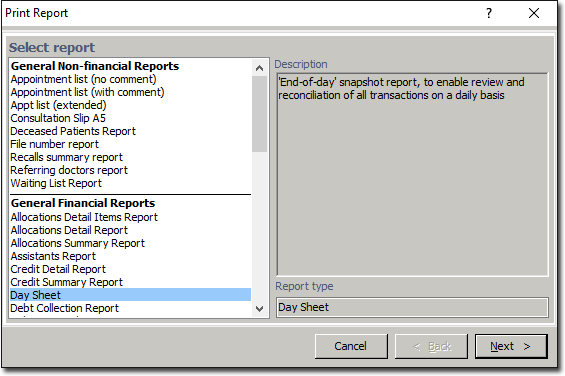
The Print Report window appears.
-
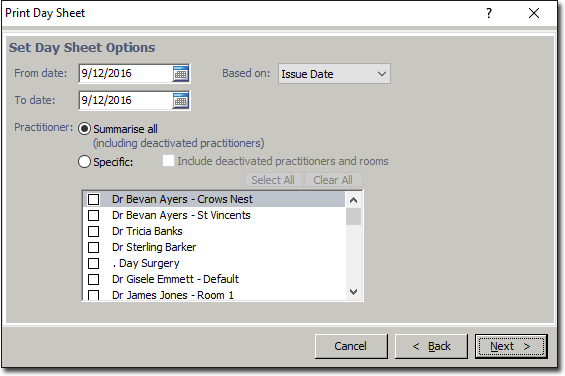
Select Day Sheet from the list of reports and click the Next button. The Print Day Sheet window appears.
Results
The section heading "The following receipt items were received on [date]:" may include receipts that have subsequently been adjusted, and the section headed "The following invoices and allocations were issued on [date]:" may include invoices that have subsequently been adjusted.
Similarly, the sections headed "The following receipts were adjusted on [date]:" and "The following invoices were adjusted on [date]:" may include adjustments to receipts and invoices that were not originally entered on the date of the Day Sheet you are looking at. This is because the Day Sheet reports every transaction that was entered on the specified date.
Because of this it may not be possible for you to easily reconcile the Day Sheet against your banking, and it was not designed with this function in mind.