Service Items Summary Report
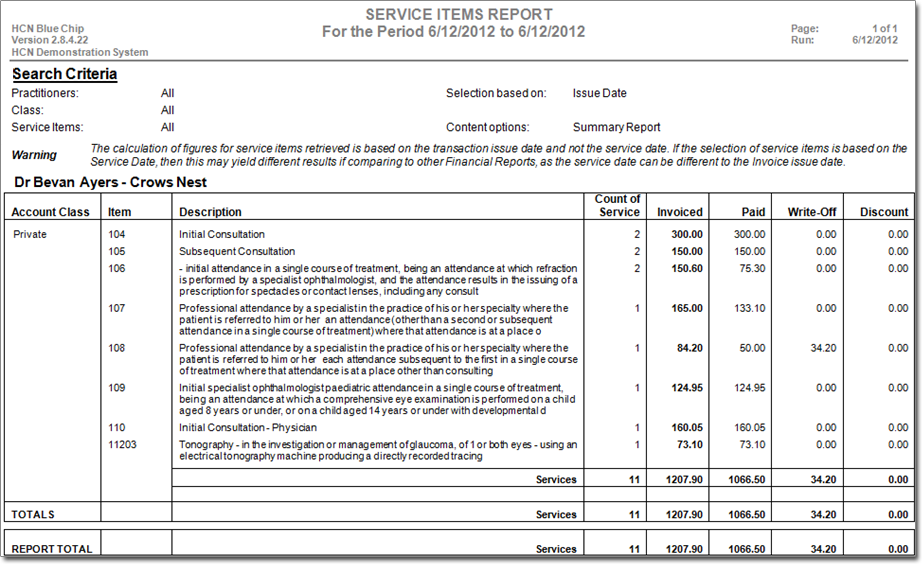
The Service Items Summary report provides a class-based summary of the number of times each service item was performed, the total invoiced, total payments, write-off, and discounts given during a specified date range.
Before you begin
Note:
This report is not to be treated as a financial report, because
it is calculated according to date of service, rather than date of entry. A report that
is calculated according to date of service, if printed on two separate occasions, with
exactly the same parameters chosen, can produce different results. This would happen if
a service that had been included in the original report, was adjusted in the intervening
period between print runs, and given a different date of service.
A financial report, such as the Earnings report, is calculated according to date of entry. As such, when printed on any number of separate occasions, it will always produce the same results, regardless of the adjustments, and so forth that may have taken place in the meantime.
About this task
Tip:
If generating a report with more than 3
years of data, export to a CSV file.
Procedure
-
Either:
- Click

- Press Ctrl + P
- Select
- Click
-
Either:
- Click
- Press Ctrl + P
- Select
- Click
-
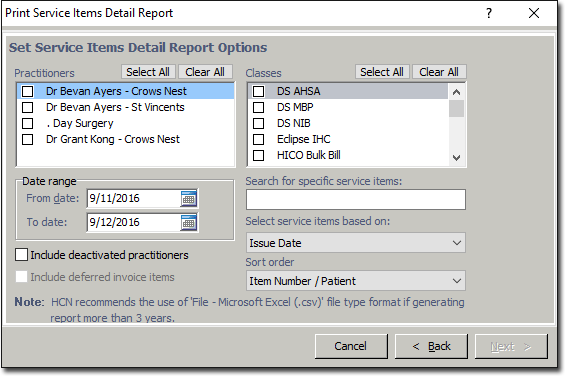
In the Print Report window, elect Service Items
Summary Report from the list of reports and click
Next. The Print Service Items Report
window appears. Note that the following example shows the 'Detailed' variation.
Results
The Service items report is split into two sections. The first gives a list of all
nominated services provided within a given date range, for each nominated Practitioner,
at each location. The second gives a summary of the number of times each of the
nominated services was provided within the given date range, for each nominated
Practitioner, at each location.