To Apply a Discount when Invoicing
Before you begin
Procedure
-
Create the invoice, as normal. During the invoicing process, tick the Discount check box. A Discount column appears.
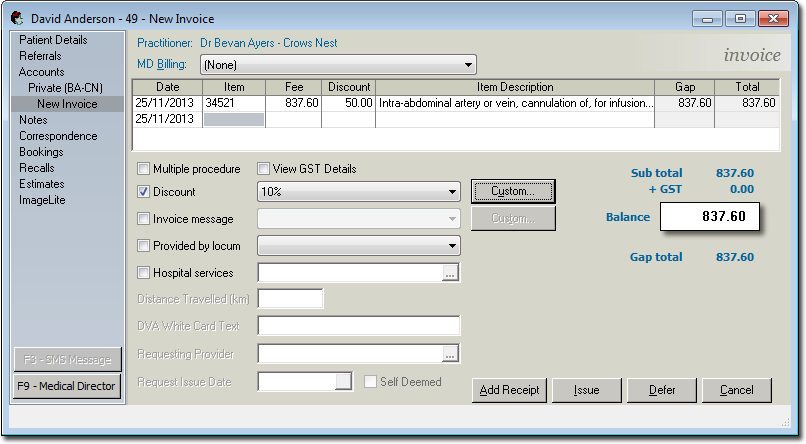
- If you enter a Service Item with a pre-defined discount applied to it, the value of that discount will automatically appear in the Discount column.
- If you want to enter a customised discount, double-click the Discount field and enter a dollar value. The example above shows that a $50 discount has been manually applied to Service Item 34521.
Results
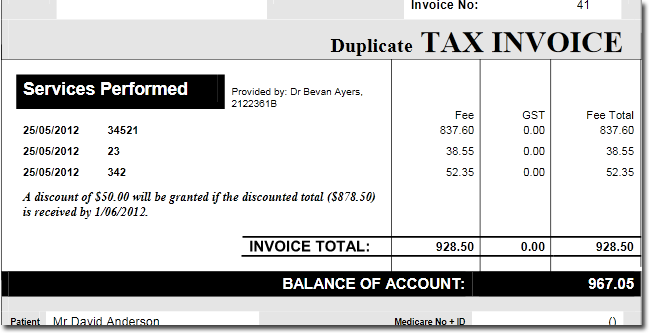
The printed invoice example below shows the discounted amount, and associated discount
message.
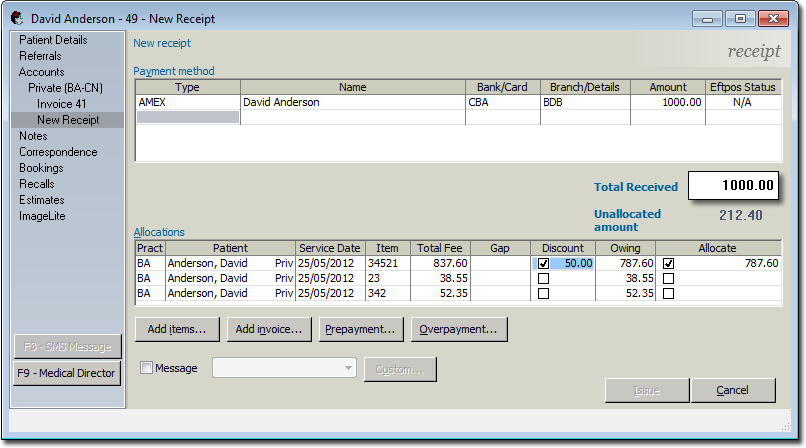
When issuing a receipt, notice that the
Discount column (shown below) automatically displays any discounts you have offered. If
you are satisfied that the discount should be applied, tick the associated check box,
and it is then that the fee for the given Service Item is adjusted. If you do not tick
the Discount check box, the discount will not be applied. Note also, that you can
override any discount value by double-clicking the value and manually adjusting
it.