
Appointment List (No Comment) Report
This report provides you with a list, in order of scheduled time of arrival, of all patients who have appointments booked on the dates you select, with the Practitioners you select, and of the appointment types you select.
Before you begin
This report is based on the dates that appointments were made and is linked to specific Practitioners.
It does not include the comments that are attached to these appointments, and is therefore a shorter report than the Appointment list (with comment).
The list is presented in the form of a table, with the following headings: Time, Duration, Patient, Type, Phone No, and File No.
- Time refers to the scheduled time of arrival.
- Duration refers to the length, in minutes, of the appointment, as scheduled.
- Patient refers to the name of the patient.
- Type refers to the appointment type that is selected when the appointment is made. The abbreviation is displayed here.
- The Phone No column will display both the main and alternate phone numbers, assuming both are entered in the patient's file.
- The File No column displays the patient's file number. If your practice does not use file numbers, then you can edit the template and remove this extra column.
About this task
- Medicare Number - [Pat_Medicare]
- Veterans' Affairs Number - [Pat_Veterans]
- Medicare Reference Number - [Pat_MedicareRef]
- Medicare Expiry Date - [Pat_MedicareExpiry]
- Patient Details Comment line - [Pat_Comment]
- Referring Dr - [RefDoc_Name]
- Date of Referral - [Pat_RefDate]
- Period of Referral - [Pat_RefPeriod]
Procedure
-
Either:
- Click

- Press Ctrl + P
- Select
- Click
-
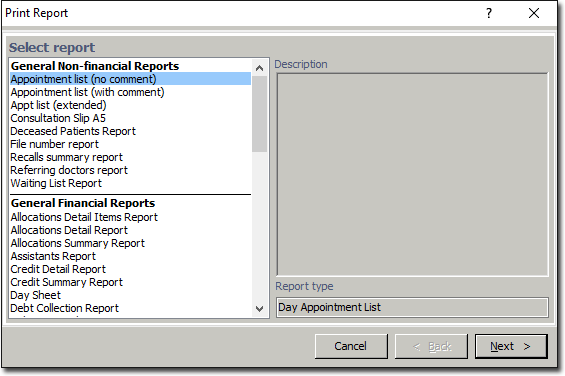
In the Print Report window, select Appointment
List (no comment) from the list of reports and click
Next.
-
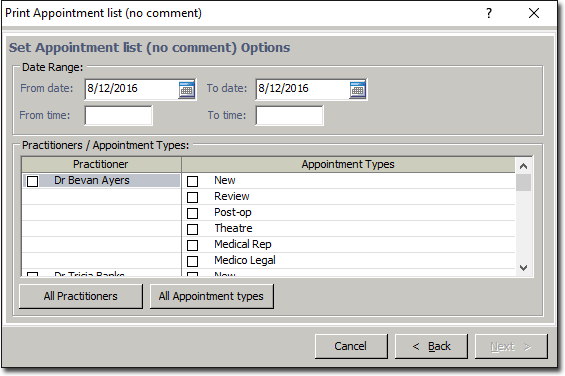
In the Print Appointment List (No Comment) window, enter the
date range for the report and then press the Tab key.
Example
For example, Mr Greg Smith has an appointment with Dr Demo Caseg, at 9.00am. His consultation appointment is scheduled for 15 minutes. He can be contacted on phone numbers 12345678, and his file number is TLG132.