
Medicare Online Claim Authorisation - New Claim Window
The Medicare Australia Online Claim Authorisation - New Claim window
allows you to select an authorisation method and the authorisation to be completed. This
window appears when you attempt to save or store a new or as yet transmitted claim.
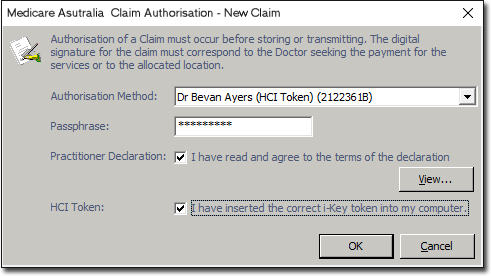
| Authorisation Method | Allows you to select an authorisation method from the drop-down box. Note: The authorisation method is either based on the Location or the HCI Token for a service provider. If the authorisation method is set to 'Location', no other inputs are required. If the authorisation method is set to Token for a service provider, the password, Practitioner Declaration check box and HCI Token check box must be entered. |
| Password | Allows you to enter the password for Practitioner i-Key. |
| Practitioner Declaration | Select this check box if you have read the Practitioner Declaration. This document is provided by Medicare and stipulates the conditions under which the claim is made. |
| View | Allows you to view the declaration. The Practitioner Declaration is a document provided by Medicare which stipulates the conditions under which the claim is made. |
| HCI Token | Select this check box if you have inserted the correct i-Key token into your computer. |
| OK | Allows you to save the settings and initiates the claim authorisation process. |
| Cancel | Allows you to cancel the claim. |