Customise plans and appointment times for individual Practitioners.
Procedure
-
In the screen for a Practitioner, click Plans.
-
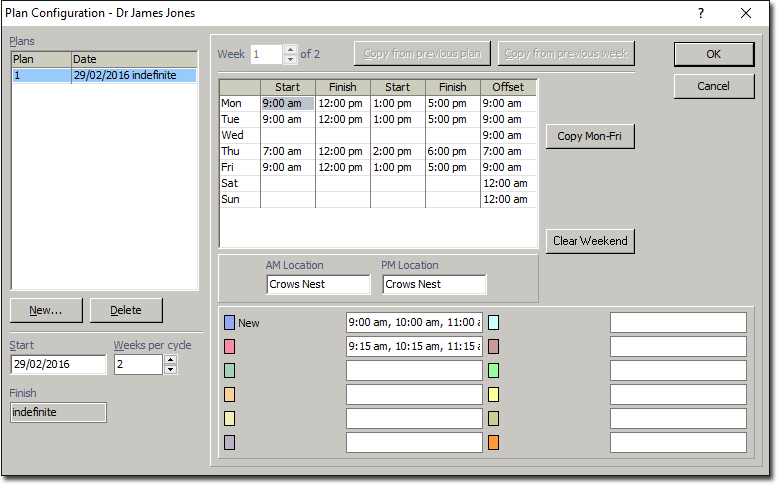
In the Plan Configuration window, enter the Plan
Start Date, and indicate the number of Weeks per
Cycle. A plan in its basic form is a series of weeks in a cycle, for
example, a four-week cycle. Where a practitioner has multiple plans, each plan
follows the previous in a sequence for example, a four-week cycle, followed by a
two-week cycle.
-
Within the body of this window enter Start and
Finish times for each day. Enter an
Offset time for each day if desired. The offset time sets
the start time of first time period displayed in the Appointment Book. If no offset
time is specified, the default time is 9:00am.
- Copy the settings for Monday to Friday, by clicking the Copy
Mon-Fri button.
- Clear a weekend by clicking the button.
- Copy from the previous week by clicking on the Copy from Previous
Week button.
-
Enter the morning and afternoon sessions, by entering a location in the AM and PM Location fields.
-
If a Practice has certain time slots allocated to each appointment type, enter each
commencing time separated by a comma and space, for example, 9:00am, 10:00am,
11:00am. Do this for each day of the week in the cycle. If the same time slots are
required, you can copy and paste timeslots from one day to another.
-
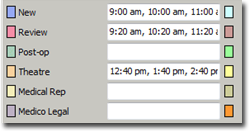
Each type of appointment (per practitioner) can be represented by a different
colour, displayed in the Appointment Book. For example, you could indicate that
New appointments will be displayed in
blue in a 9am, 10am, 11am, etc. time slot, whereas
Review appointments will be red in a
9:20am, 10:20pm, 11:20pm, etc. time slot.
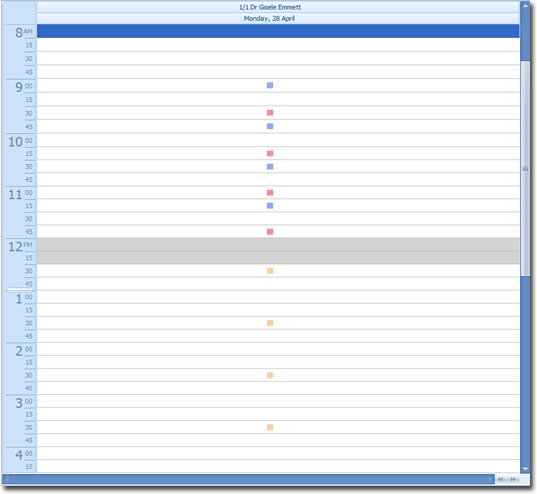
This image shows how the preceding setup is displayed in the Appointment Book.
-
Click OK to confirm settings for the current week. If a Week
2 is required, click back into Plans and repeat the above
steps. Each new week is entered and confirmed separately.
-
Repeat the above steps for each Practitioner.
Results
In the Appointment Book, appointments that can be booked for this Practitioner match
the plans and appointment start times defined in the Plan
Configuration window.
